Fusion for CNC CAM · Working draft
Plan the cut
in the software.
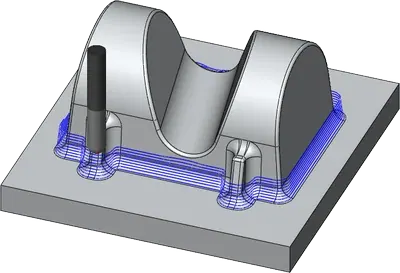
Explore the next step after modelling: setting up machining operations in Fusion. This future class focuses on the software workflow, with machine operation covered through separate training.
C$110 Regular C$150One software session per registration, before tax.
Working draft. We’re continuing to develop the course details.
- Focus
- CAM setup in Fusion
- Format
- Software only
- Dates and price
- To confirm
- Registration
- Waitlist preview
The class at a glance
Turn a model into a machining plan.
CAM is where you plan how a cutting tool will approach a design. This course draft separates that planning work from learning to operate a CNC machine.
Proposed learning focus
Understand the setup
Review how the model, material and machining setup relate.
Plan machining operations
Explore how tools and cutting operations are represented in Fusion.
Review before machining
Understand why a software plan needs checking before moving to a machine.
Proposed class outline
| Focus | Guided practice |
|---|---|
| Set up the job | Proposed model, stock and setup introduction. |
| Plan the operations | Proposed introduction to choosing tools and creating toolpaths. |
| Review the plan | Proposed simulation and review of the machining sequence. |
Tool access
Software practice. Separate machine training.
This course does not include operating a CNC machine or grant machine access. Maker Cube’s current CNC Router Orientation uses VCarve.
Before your visit
Come ready to make.
Keep practising in Fusion
If you are still learning the modelling basics, start with Intro to Autodesk Fusion.
Before a future session
Required experience, software features, licence requirements and the class exercise will be confirmed before bookings open. No plan purchase is requested by this draft.
Questions before you book.
Does this include CNC machine operation?
No. This is a software-only class. Operating Maker Cube machines requires separate training and the relevant access arrangements.
When will the class run?
There are no confirmed dates in this draft. The waitlist is the proposed way to register interest in future sessions.
Is the waitlist active?
This private preview lets you review the signup flow. It does not send or save a signup.
Draft details for review
Working draft retained by Adam’s request on November 25, 2026. Revisit and develop this course before approving the final listing. Image provenance is recorded in fusion-course-image-sources.json.
Confirmed in project direction: Fusion CAM is a separate software-only class; no CNC operation included. User requested a linked future class and waitlist for now. The detailed outline is proposed, not verified from a current manual. Dates, price, duration, capacity, project, instructor, prerequisites and age/consent policy remain unconfirmed. A possible February return was earlier discussion, not a confirmed schedule. The waitlist has no network request, local storage, CRM write or message delivery.
Dates and registration
- Schedule, instructor and capacity still require verification. No registration offered.
One registration covers every listed visit of a multi-session cohort. Continuation visits do not sell separate places.