Fusion Design for Personal Manufacturing · Working draft
Design for the way
you want to make.
Build a practical Fusion workflow for your own projects. Across five Saturdays, explore design techniques through real making examples and apply what you learn to ideas you want to develop.
C$550 Regular C$600Five sessions per registration, before tax.
Working draft. We’re continuing to develop the course details.
- Format
- Five Saturdays
- Prerequisite
- Intro to Autodesk Fusion
- Project
- Your own, throughout the course
- Next dates
- February 20–March 20, 2027 · Proposed
The course at a glance
Learn the workflow.
Develop your own project.
A useful model starts with understanding what you want to make and how you might make it. This course connects Fusion’s tools to practical workflows for 3D printing, CNC routing and plasma cutting, with time to develop your own projects as you go.
What you’ll get from the course
Choose a useful approach
See how different parts of Fusion can help solve a making problem, from working with a drawing to using scan data or preparing a design for fabrication.
Build, review and iterate
Understand the choices behind a design, revisit it and make improvements using examples drawn from previous courses.
Apply it to your own work
Bring a project you care about and develop it alongside the guided modules, with feedback on how to approach the next step.
Explore the modules and project examples
Previous courses have used the examples below. Each group draws from these modules according to its experience, interests and projects, with room for personal project work throughout.
| Module | Examples and learning focus |
|---|---|
| From drawing to model | Build a part in Fusion from a drawing and connect dimensions to the finished shape. |
| Design, revisit and improve | Use projects such as a headphone stand or desk caddy to explore design choices and iteration. |
| Print-in-place parts | Explore designing parts to print together as a working assembly. |
| Sheet Metal for plasma cutting | Use the Sheet Metal workspace to develop designs with plasma cutting in mind. |
| CNC design and CAM basics | Work through examples such as a flat-pack stool and the basics of CAM for Maker Cube’s CNC workflow. |
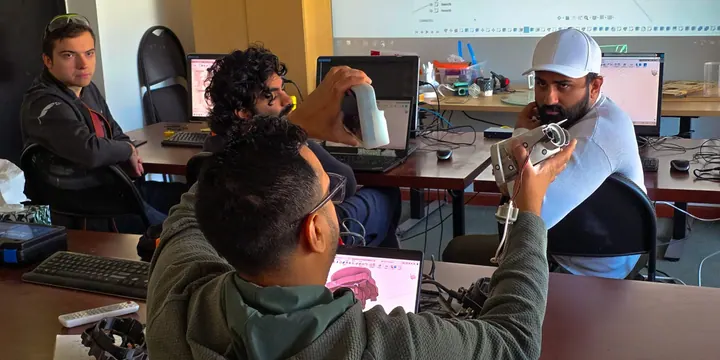
| Mesh data and reverse engineering | Use scan data to explore how an existing object can inform a model. |
People with machining, programming or CAD experience can also explore less familiar parts of the software and see how they fit into practical shop workflows.
Design for making
Connect the software
to the shop.
Learn why a workflow works for a particular process, then use that thinking in your own designs. The course’s examples connect digital modelling with real making at Maker Cube.
Independent machine use still requires the relevant training and access arrangements. Specific materials, printing and machine time for the next offering will be confirmed with the course details.
For focused machining-software training, see Fusion for CNC CAM.
Before your visit
Come ready to make.
Start with Intro to Autodesk Fusion
Intro to Autodesk Fusion is the prerequisite for this course. It establishes the modelling foundation used in the guided modules.
Bring a project or an idea
Bring something you would like to develop. Personal projects run alongside the modules, so you can put new techniques to use as you learn them.
Prepare your computer
Bring your laptop, mouse and charger, with Fusion installed and working. See the free account setup guide if you need help getting started.
Contact Maker Cube if you need to arrange a class computer.
Questions before you book.
Do I need to take Intro to Autodesk Fusion first?
Yes. Intro to Autodesk Fusion is the prerequisite for this course, including for people with previous CAD experience.
Do I need to complete the whole 30 day online series?
No. Complete Intro to Autodesk Fusion before attending. The external online series is not a separate current prerequisite.
Will every group cover every module?
The examples form a flexible teaching menu. The mix and pace follow the group’s experience and projects, with personal project work throughout the five Saturdays.
Does one booking cover all five days?
Yes. One course booking covers all five Saturdays.
Can I take this if I already use CAD?
The course can help you explore unfamiliar tools and practical making workflows. Previous participants have included machinists and programmers. Intro to Autodesk Fusion remains the prerequisite.
Will I use machines or receive materials?
Specific materials, printing and machine time will be confirmed for the next offering. The course does not replace the relevant machine training or independent access requirements.
When does the next course start?
New dates have not been announced. Join the waiting list to hear when the next course is available.
What is the age policy?
Contact Maker Cube about age and consent requirements for this longer course. The Intro class’s age policy does not automatically apply.
Course details for review
Working draft retained by Adam’s request on November 25, 2026. Revisit and develop this course before approving the final listing. Image provenance is recorded in fusion-course-image-sources.json.
Adam’s November25 reconstruction is the primary source for these modules. Upcoming direction: five Saturdays,600CAD before tax, Intro to Autodesk Fusion prerequisite and ongoing personal projects. Historical500CAD/five-session pilot details are superseded for the upcoming offering.
Module examples were taught previously; the full menu is not promised in every group. Coverage varied significantly with group experience. A selected subset of external online lessons may be designed later; it is deferred and not currently a prerequisite.
The historical summer-camp summary supports measuring real objects, modelling, printing and iteration. Its old prices, ages, capacity and five-day timetable were not transferred. The older Fusion lesson plan supports design-workflow context; its trial/licence/UI instructions were not reused. Full original website prose remains unrecovered, but no longer blocks a source-grounded description because Adam supplied the course content directly.
Dates, daily hours, capacity, long-course age policy, exact module selection and material/machine-time inclusions remain open. No schedule, tickets or integration changes.
Dates and registration
- Schedule, instructor and capacity still require verification. No registration offered.
One registration covers every listed visit of a multi-session cohort. Continuation visits do not sell separate places.