Design Thinking and 3D Modelling with Autodesk Fusion · Langley, BC
Get comfortable
designing in 3D.
Learn your way around Autodesk Fusion and turn a simple drawing into a 3D model for 3D printing, shop drawings and project planning.
New to Fusion, or stuck following tutorials?
- Class length
- 3 hours*
- Experience
- New to Fusion or ready to get unstuck
- What you’ll keep
- Your practice files
- Who can attend
- Everyone aged 14+
The class at a glance
Design with a clearer picture.
Work out sizes, explore shapes and make changes before you start making a project. Whether you’re opening Fusion for the first time or have worked through tutorials and hit a wall, this class helps you understand what’s happening and what to try next.
What you’ll get from the class
Find your way around Fusion
Learn the main controls, move around your model and switch between drawing a sketch and working in 3D.
Build a model from a sketch
Draw a simple shape, give it dimensions and turn it into a solid model. See how the steps connect as your design takes shape.
Adjust your design
Use dimensions and simple rules to control your sketch, then change your model without drawing everything again.
Class outline: what you’ll do
| Stage | Guided learning and practice |
|---|---|
| Get oriented | Find the main tools and practise moving around a model. |
| Start with a sketch | Draw a simple shape and use dimensions and constraints to control it. |
| Work in 3D | Turn your sketch into a solid shape and inspect it from different angles. |
| Make changes and keep practising | Adjust your design, ask questions and save your practice files to revisit at home. |
Keep learning after class
Keep making progress.
This class is designed to make online tutorials more approachable by working through the common problems that block progress. We share the best practices that have helped many learners move forward, so you can understand the steps, spot what’s gone wrong and keep building your skills.
For continued practice after class, work through Product Design Online’s Learn Autodesk Fusion in 30 Days for Complete Beginners at your own pace.
Continue with Fusion Design for Personal Manufacturing, a six-day course where you develop your own projects alongside guided modules. This introduction is its prerequisite.
Learn with us
Meet Adam.
Adam is a co-founder of Maker Cube who uses Fusion in his own design work. He built this introduction around the things he wished someone had explained when he was starting out, with time for questions and a focus on understanding the software.
“I designed this class to answer all the questions I had getting started with Fusion.”
Adam Ali, your instructor
Before your visit
Come ready to learn.
Set up Fusion for free
The class uses Autodesk’s free Fusion for Personal Use option for eligible hobbyists working on personal, non-commercial projects.
- Open Autodesk’s free Personal Use page and choose Get Autodesk Fusion for personal use.
- Sign in to your Autodesk account, or create a free account.
- Complete the Personal Use registration form.
- Select Download Now to activate your access and download Fusion. If you already have Fusion installed, complete the activation step using the same account.
- Open Fusion, sign in and check that you can create and save a practice design before class.
Already using Fusion? Keep your existing account. Allow time for access to activate. If you get stuck, ask us for setup help or check Autodesk’s registration guide.
What to bring
- A laptop that can run Autodesk Fusion.
- A mouse and your laptop charger.
- Fusion installed and tested before class.
- Your Autodesk sign-in details and access to any account verification you need.
Contact us before class if you need to arrange a class computer.
Basic computer skills are enough.
You should be comfortable using a mouse, browsing the internet and saving files. We’ll introduce the modelling tools during class.
For participants under 19
A parent or guardian must sign the consent form before class or at drop-off. Participants aged 14+ can attend without a parent staying.
Arrive 15 minutes early.
Check in at #104B 5947 206A Street, Langley. Parking is available in the lot and along 206A Street. Contact Maker Cube if you’re running late so we can advise you about joining.
Questions before you book
A few more things.
What is Autodesk Fusion?
Autodesk Fusion is software for drawing and building 3D models on a computer. You can turn a flat drawing into a shape, look at it from different angles and change its size or details as your idea develops.
Is this class suitable for a complete beginner?
Yes. You can start here with no previous 3D modelling experience. It is also useful if you have tried Fusion or followed tutorials but keep getting stuck. You should be comfortable using a computer, browsing the internet and saving files.
Can this be a useful class for my child?
Yes. Ages 14+ can attend this computer-lab class without a parent staying. For anyone under 19, a parent or guardian must sign the consent form before class or at drop-off.
What is the minimum age, and does a parent need to attend?
Ages 14 and up. A parent does not need to stay because the class takes place in the computer lab. Participants under 19 need a parent or guardian to sign consent before class or at drop-off. Everyone needs a waiver.
Do I need to take the linked online course first?
No. Product Design Online’s course is optional practice after this introduction.
Does this class teach CAM or CNC machine operation?
This class focuses on 3D modelling. Fusion for CNC CAM covers machining setup in the software and has a waitlist for future sessions. Machine operation requires separate training.
Do I need to be a Maker Cube member?
Everyone is welcome to book, including first-time visitors. Membership and the relevant orientations and tool signoffs are required for independent shop use afterward.
I don't have a suitable laptop. Can I use a computer at Maker Cube?
Contact us before booking to check availability and arrange a class computer.
Is Autodesk Fusion free?
Yes. The free Personal Use option includes the basic modelling tools used in this class. See Set up Fusion for free for the account and installation steps.
Will I make a physical object during class?
You will work on the computer and save your Fusion project files. The class does not include printing, cutting or machining an object.
Can I bring my own design idea?
Yes. Bring your questions and an idea you would like to work toward. The class follows shared exercises, with time for individual questions as the group’s pace allows.
Can I eat during class?
Lidded water bottles are welcome. Please keep food out of the computer lab. You can have a snack in reception before or after class.
What if I need to cancel, reschedule or send someone else?
Email [email protected] at least 24 hours before class to cancel or reschedule. Refunds or credit are available with the required notice.
Late cancellations and no-shows are not refundable. Rebooking costs 50% of the original regular class price before discounts. You may send an eligible replacement who meets the class’s prerequisite, age, waiver and safety requirements.
If Maker Cube moves or cancels a regular booking, staff will contact you about another date, a makeup, a different class or a full refund. Promotional package bookings retain the terms of their original offer.
Draft details for review
Owner corrections recorded November 25: this is Intro to Autodesk Fusion, focused on beginner 3D modelling. No CAM tools or machine operation are taught. Fusion for CNC CAM is a separate software-only class; a possible February 2027 return depends on interest and has not been scheduled. Current CNC training uses VCarve.
The linked 30 day series is a practice companion after the intro. Intro to Autodesk Fusion is the prerequisite for Fusion Design for Personal Manufacturing. The full external series is not required; any selected preparation lessons will be reviewed later. The existing Maker Cube course is linked; waiting-list registration is used while dates are unavailable.
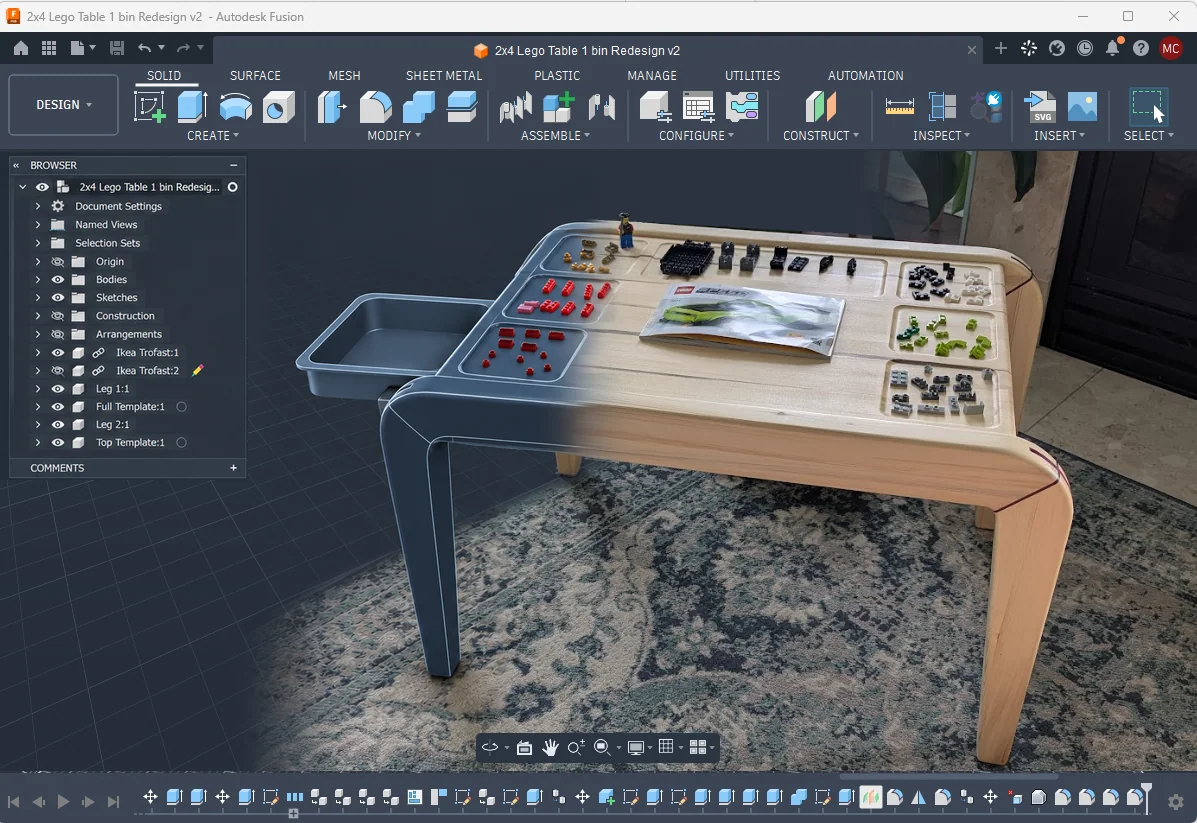
Confirmed Intro age policy:14+, no parent attendance required in the computer lab; under19 consent signed before class or at drop-off. This does not establish the age policy for other classes. Confirm the exact guided exercise, current price, duration, workstation capacity and student software setup. The hero uses Enzo’s updated LEGO table model-to-finished-build image. It illustrates a project made with Fusion and is not promised as the beginner class exercise. The second class photograph was removed at Adam’s request.
Upcoming dates and cohorts
Times are local to Langley, BC. One registration covers all dates listed together.
- Sat, Dec 12, 2026 · 10:30am–1:30pm PT
Ticket and checkout verification pending.
Closed-toe shoes. Required to enter the facility. If you miss the start of class, you won’t be able to join.