CNC Plasma Table Orientation · Langley, BC
Cut your parts.
Get building.
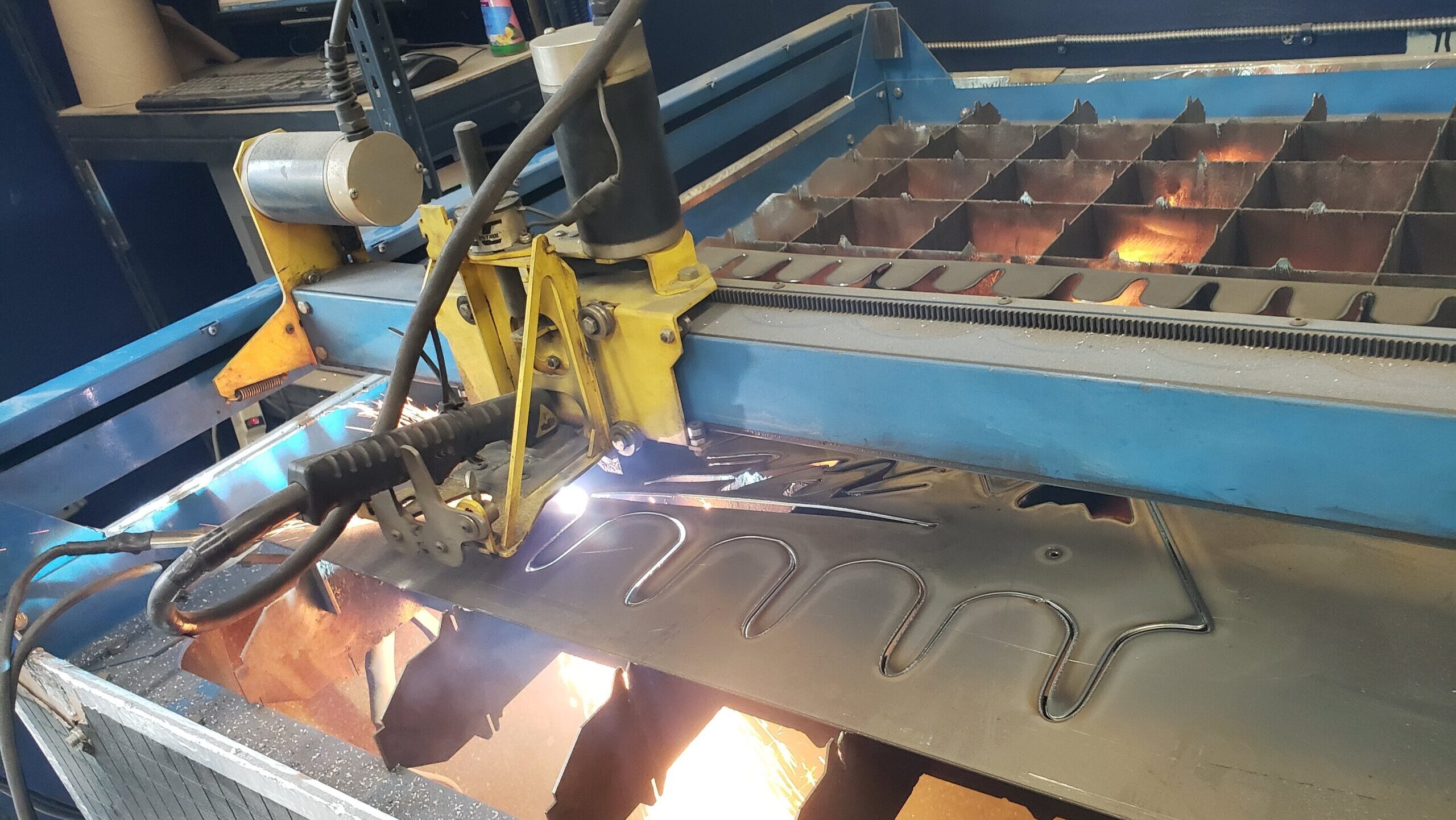
Make complex shapes, flanges and parts with accurately spaced holes more quickly. Learn how to turn a digital drawing into a cut part using Maker Cube's CNC plasma table.
C$110 Regular C$150Full course per registration, before tax.
MIG Welding is required before this class. Members and non-members are welcome.
- Class length
- 3 hours
- Prerequisite
- MIG Welding
- You'll work in
- PlasmaCAM
- Minimum age
- 14 and up
Why learn CNC plasma?
More possibilities
for your metal projects.
Digital tools give you another way to take on metal projects. Start with a drawing, then use the plasma table to cut curves, detailed shapes and matching parts that would be challenging to make by hand.
This class is for members who want access to Maker Cube's CNC plasma table, and anyone who wants to understand the basics of CNC plasma cutting on an approachable tool.
The class at a glance
Learn the workflow,
with someone beside you.
No previous plasma-cutting experience is needed. Your instructor walks you through using a prepared drawing, setting up the table and making a cut.
Want to create your own files? Explore VCarve Pro for 2D drawing or Fusion for 3D modelling.
Get a drawing ready
Open a prepared design in PlasmaCAM and learn how to get it ready for cutting.
Set up and cut
Work through placing the metal, checking the setup and watching the machine while it cuts.
Check your parts
Look at the cut edges, discuss any cleanup and learn what to check before the next job.
See the detailed class outline
Prepare a file: import an existing vector drawing, check its size and plan the cutting paths and order.
Prepare the table: review material support, the work connection, torch position, consumables, extraction, compressed air and protective equipment.
Run and monitor a cut: check positioning and boundaries, watch for moving parts and heat distortion, and learn when to stop for help.
Finish the job: inspect the cut, discuss hot-metal handling and edge cleanup, then review shutdown and leaving the station ready.
Use the table at Maker Cube
A starting point for
your own metal projects.
For members, this is the orientation for Maker Cube's CNC plasma table. Independent use requires successful completion, your instructor's tool authorization and an active membership. Further supervised practice may be needed.
Before your visit
Come ready to cut.
Complete MIG first
Take Maker Cube's MIG Welding class before attending Plasma Cutting Orientation. Previous experience elsewhere does not replace the required orientation.
Class computers
Plasma CAM is used on Maker Cube computers only. No personal laptop or software installation is required.
Wear and bring
- Long sleeves and long pants suitable for sparks and hot metal.
- Closed-toe footwear suitable for the metalshop.
- Avoid synthetic fabrics that can melt.
- Follow the instructor's requirements for eye and face protection, hearing protection, gloves and respiratory protection.
Bring your project questions. Contact Maker Cube before bringing outside stock or planning to cut a personal design during class.
Arrive 15 minutes early
Allow time for check-in before safety instruction begins. If you arrive late and miss it, you may not be able to join. Contact Maker Cube if you are running late.
Find us in Langley
#104B, 5947 206A Street, Langley, BC. Parking is available in the lot, with additional street parking along 206A Street.
A few more things
Questions before you book.
Do I need to complete MIG Welding first?
Yes. Complete Maker Cube's MIG Welding class before attending Plasma Cutting Orientation. The plasma class is open to members and non-members who meet this prerequisite.
Can I bring a young maker?
Learning together can give you a shared understanding of the process and help you plan future projects. Both participants must meet the MIG prerequisite. Contact Maker Cube about supervision and ticket arrangements before booking together.
What is the minimum age?
This class is for ages 14 and up. Everyone needs a waiver, and participants under 19 need guardian consent. Contact Maker Cube about supervision before booking a minor.
Is this class suitable for beginners?
Yes. You do not need previous CNC or plasma-cutting experience. Complete Maker Cube's MIG Welding class first, then your instructor will guide you through the plasma table's workflow.
Do I need a membership to take this class?
No. Members and non-members can take the class after completing MIG Welding. Independent equipment use afterward requires an active membership and individual tool authorization.
Will I learn to draw my own parts?
You will work with an existing drawing and learn how to prepare it for cutting. To create your own files, explore VCarve Pro for 2D drawing or Fusion for 3D modelling.
Will I take home a finished project?
The class is an equipment orientation focused on the cutting workflow. A specific take-home object is not advertised. Discuss personal projects and outside materials with Maker Cube before class.
Does this authorize me to use other metalshop tools?
Authorization applies to the equipment and operations you have demonstrated and been cleared to use. Other tools and unfamiliar operations may require their own orientation and staff signoff.
What if I need to cancel or change my booking?
For regular bookings, email [email protected] at least 24 hours before class to cancel or reschedule. Refunds or credit are available with the required notice. Late cancellations and no-shows are not refundable. Rebooking costs 50% of the original regular class price before discounts. An eligible replacement must meet the MIG prerequisite, age, waiver and safety requirements. Promotional packages follow their original purchase terms.
What if Maker Cube changes the class?
For a regular booking, staff will contact you about rebooking, an arranged makeup, a different class or a full refund. Promotional packages follow the terms attached to the original purchase.
Draft source notes
Latest copy direction confirmed by Adam: focus on making complex shapes, flanges and parts with accurately spaced holes more quickly. Present digital tools as another way to take on metal projects. The audience is members seeking table access and people wanting to understand CNC plasma basics on an approachable tool. Remove the older-software caveat and repeated manual-layout emphasis. Technical topics remain in the expandable outline. MIG remains required.
Quick Scan layout approved November 25, 2026. MIG Welding prerequisite confirmed by Adam and takes precedence over the old listing. The current public listing supplies the three-hour duration, $149 price, 14+ minimum age and 2 to 6 group size. Planning record recrzAvk1jBjYg0PF proposes January 25, 2027, 6 to 9 p.m. with Doug. Price, seats and On Website are blank; none establishes free admission, availability or publication status. The $149 observation is not approval for this offer. This draft creates no live booking.
Curriculum uses the Plasma CNC class outline and the PlasmaCAM guide. Practice stock, take-home arrangements, current instructor and equipment-protection provision are not newly promised. This page is not a machine operating procedure.
Existing plasma class listing · Class outline
Upcoming dates and cohorts
Times are local to Langley, BC. One registration covers all dates listed together.
- Mon, Jan 25, 2027 · 6pm–9pm PT
Ticket and checkout verification pending.
Closed-toe shoes. Required to enter the facility. If you miss the start of class, you won’t be able to join.